School Dinners

Lunchtimes
The children all stay for dinner at lunchtime and have a choice of meals each day.
You can choose to provide your child with a packed lunch each day which they would take to the junior hall at lunchtime. Most children have a school dinner each day.
They get a choice of either:
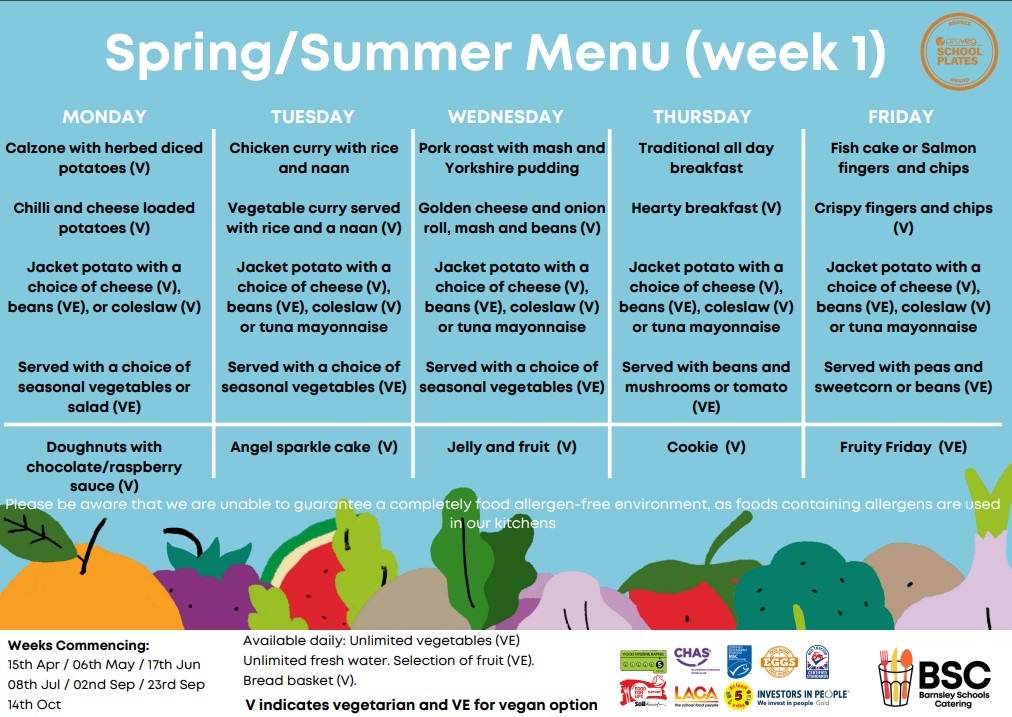
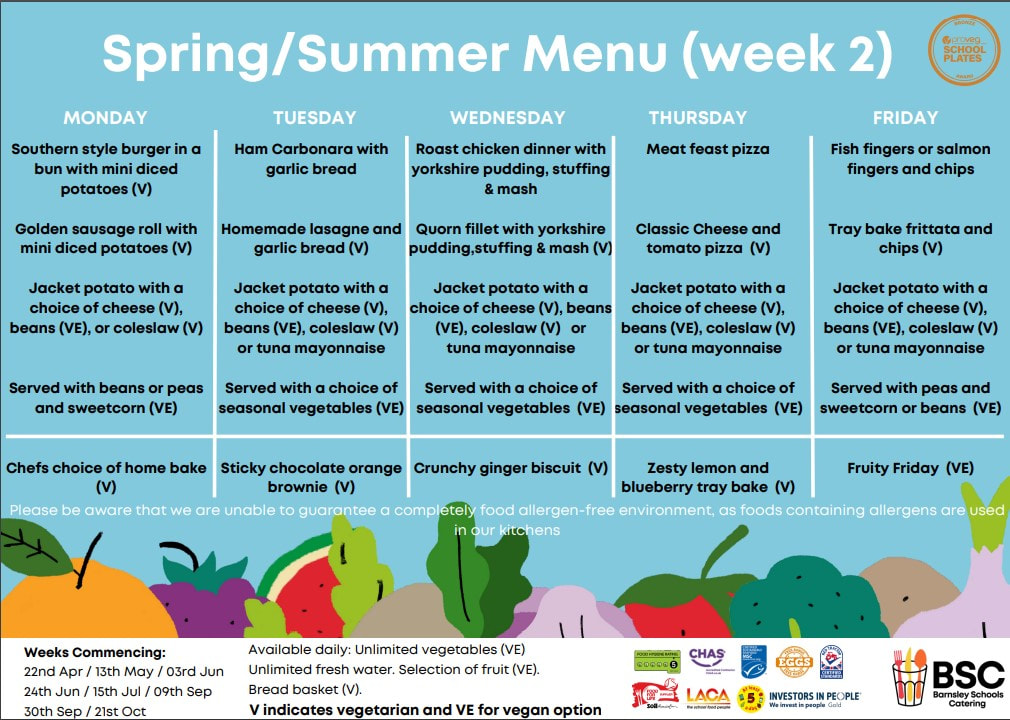
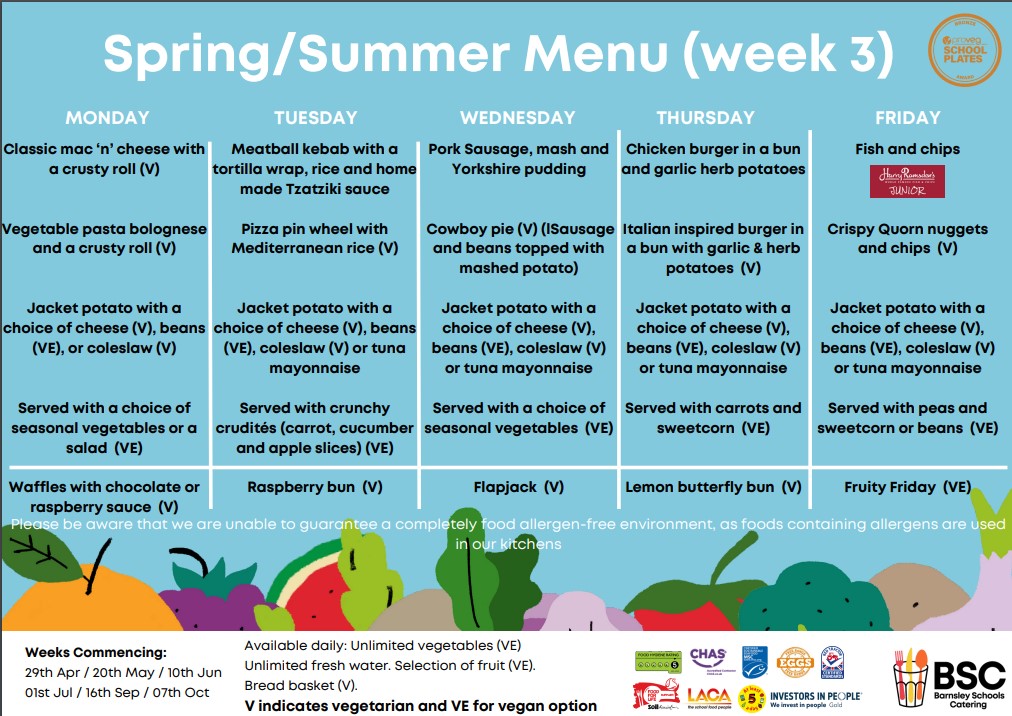
– A Traditional lunch consisting of the traditional type of school meal like meat pie and vegetables, or fish pieces and chips with a hot pudding (see menu below).
– A Vegetarian option is also available.
– An Alternative option will be available this will be either a jacket potato with a variety of fillings or a wrap.
Each day your child will choose what they want and the order is prepared in the kitchen.
Costs and How to pay
The school operates a cashless system via the School Gateway App.
This can be downloaded and accessed using the following steps:
1. Search for “School Gateway” in the Apple App Store/Google Play or on your phone go to www.schoolgateway.com/apple (Apple) or www.schoolgateway.com/android (Android)
2. Install the app and if you are asked then say yes to “Allow Push Notifications”
3. When you launch School Gateway for the first time, please select ‘New User’ and enter the email address and mobile telephone number you have registered with the school
4. The system will send a PIN code to your phone; please enter this PIN code and the app will be activated for you.
School lunches cost £2.50 per meal. The minimum amount that can be paid via the gateway app is £10.00, this will cover your child for a week’s worth of school meals.
There is no limit to the amount of money held in a child’s account, and it does not have to be paid on any set day.
Although the school does operate a zero tolerance debt policy, so all school meals need to be paid for in advance. Please see our Dinner Debt Policy
To find out more information about Free School Meals or Universal Free School Meals (for children in KS1) – please click here or ask at the school office.
Fruit in school
As part of the government’s healthy schools initiative, the school receives fruit to give freely to our Infant children each day. The types of fruit include apples, oranges, pears, bananas – even carrots.
If any child in school wants to bring their own fruit to eat at playtimes that is fine, although it should be clearly labelled with the child’s name and class on it. We do not allow sweets, chocolates or fizzy drinks to be brought into school. Sometimes, when there are spare pieces of fruit from the Infants this is shared out to the Junior classes.
Water in school
The latest research about learning has shown that children are quite often dehydrated when they are in school. If they are dehydrated they will not learn as well.
As a result we have bought two water coolers to use in our school that dispense cool filtered water.
Children are asked to bring their own named water bottles to school to use and refill from the water coolers.
Many children take their bottles home at night and bring them to school with cold water in. This makes the start of the day a lot easier.
The children all stay for dinner at lunchtime and have a choice of meals each day.
You can choose to provide your child with a packed lunch each day which they would take to the junior hall at lunchtime. Most children have a school dinner each day.
They get a choice of either:
– A Traditional lunch consisting of the traditional type of school meal like meat pie and vegetables, or fish pieces and chips with a hot pudding (see menu below).
– A Vegetarian option is also available.
– An Alternative option will be available this will be either a jacket potato with a variety of fillings or a wrap.
Each day your child will choose what they want and the order is prepared in the kitchen.
Costs and How to pay
The school operates a cashless system via the School Gateway App.
This can be downloaded and accessed using the following steps:
1. Search for “School Gateway” in the Apple App Store/Google Play or on your phone go to www.schoolgateway.com/apple (Apple) or www.schoolgateway.com/android (Android)
2. Install the app and if you are asked then say yes to “Allow Push Notifications”
3. When you launch School Gateway for the first time, please select ‘New User’ and enter the email address and mobile telephone number you have registered with the school
4. The system will send a PIN code to your phone; please enter this PIN code and the app will be activated for you.
School lunches cost £2.50 per meal. The minimum amount that can be paid via the gateway app is £10.00, this will cover your child for a week’s worth of school meals.
There is no limit to the amount of money held in a child’s account, and it does not have to be paid on any set day.
Although the school does operate a zero tolerance debt policy, so all school meals need to be paid for in advance. Please see our Dinner Debt Policy
To find out more information about Free School Meals or Universal Free School Meals (for children in KS1) – please click here or ask at the school office.
Fruit in school
As part of the government’s healthy schools initiative, the school receives fruit to give freely to our Infant children each day. The types of fruit include apples, oranges, pears, bananas – even carrots.
If any child in school wants to bring their own fruit to eat at playtimes that is fine, although it should be clearly labelled with the child’s name and class on it. We do not allow sweets, chocolates or fizzy drinks to be brought into school. Sometimes, when there are spare pieces of fruit from the Infants this is shared out to the Junior classes.
Water in school
The latest research about learning has shown that children are quite often dehydrated when they are in school. If they are dehydrated they will not learn as well.
As a result we have bought two water coolers to use in our school that dispense cool filtered water.
Children are asked to bring their own named water bottles to school to use and refill from the water coolers.
Many children take their bottles home at night and bring them to school with cold water in. This makes the start of the day a lot easier.
Please scroll down to find our weekly school dinner menus. Please be aware that these menus may be subject to slight changes made by our kitchen staff.